

How to Choose the Best UniFi Access Point for Your Home, Business, School, Hotel, or Enterprise Network
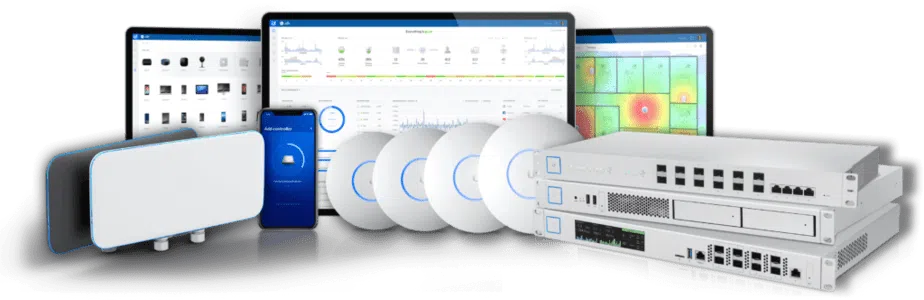
Wireless connectivity has become the backbone of modern businesses and homes. Whether you’re designing a new network, upgrading outdated Wi-Fi infrastructure, or expanding an existing deployment, choosing the right Ubiquiti UniFi Access Point is one of the most important decisions you’ll make.
Unlike traditional consumer Wi-Fi routers, UniFi Access Points are purpose-built for reliable, scalable, and centrally managed wireless networking. They are designed to deliver consistent performance across offices, schools, hotels, hospitals, retail stores, warehouses, apartment buildings, and enterprise environments where dozens—or even hundreds—of devices connect simultaneously.
However, selecting the right access point is no longer as simple as buying the fastest model available. Modern wireless networks must account for building size, wall construction, user density, internet speed, Power over Ethernet (PoE) requirements, uplink capacity, and future expansion. A model that’s ideal for a small office may struggle in a university campus, while a high-end enterprise access point could be unnecessary for a boutique retail store.
This guide explains everything you need to know before investing in Ubiquiti UniFi Access Points. We’ll compare the latest Wi-Fi 7 (U7 Series) and Wi-Fi 6 (U6 Series) models, explain where each model performs best, highlight common deployment mistakes, and help you identify the right access point for your specific environment.
Whether you’re searching for a Ubiquiti Access Point in Kenya, planning a complete UniFi network deployment, or simply comparing different UniFi models before making a purchase, this guide will help you make a confident and informed decision.
At a Glance: Quick Recommendations
If you need an immediate answer for your deployment, here is our quick recommendation matrix:
Looking For… |
Recommended Model |
Key Benefit |
|
Best Overall |
UniFi U7 Pro |
Wi-Fi 7 tri-band performance with 2.5 GbE uplink |
|
Best Value |
UniFi U6+ |
Compact Wi-Fi 6 coverage for budget-conscious setups |
|
Best for High Density |
UniFi U7 Pro Max |
Dedicated spectral engine for massive client environments |
|
Best Long Range |
UniFi U7 LR / U6 LR |
High-gain antenna pattern for wide coverage areas |
|
Best for Hotels & Multi-Room |
UniFi U7 In-Wall / U6 IW |
Integrated multi-port Ethernet switch per room |
|
Best Outdoor AP |
UniFi U7 Pro Outdoor / U6 Mesh |
Weatherproof IP-rated enclosures for open areas |
Why Ubiquiti UniFi Rules Enterprise Networking in Kenya
Businesses across Kenya—including corporate offices, boutique hotels, schools, hospitals, retail outlets, and multi-dwelling residential complexes—continue to standardize on Ubiquiti UniFi Access Points. The driver is simple: UniFi delivers enterprise-grade performance, centralized cloud management, and continuous security updates without recurring per-device subscription license fees.
Deploying UniFi APs across Kenyan commercial properties allows network administrators to manage multi-site networks from a single dashboard. Combined with robust hardware designed to handle high client densities and harsh environmental conditions, UniFi provides a low total cost of ownership (TCO) for local IT environments.
Which Access Point Should You Buy?
Use this quick “If This… Then That” decision matrix to align your deployment requirements with the optimal UniFi AP model:
If You Have… |
Recommended AP |
Primary Reason |
|
Small Office / Home Office |
UniFi U7 Lite / U6+ |
Cost-effective dual-band/tri-band Wi-Fi for low to moderate device counts. |
|
Medium Corporate Office |
Tri-band Wi-Fi 7 with 6 GHz band support to offload modern laptops and phones. |
|
|
Hotel / Serviced Apartments |
UniFi U7 In-Wall |
Sleek wall-plate mounting that doubles as an in-room Ethernet switch. |
|
Warehouse / High Ceiling |
Broad antenna coverage pattern designed to penetrate non-standard layouts. |
|
|
University / Auditorium |
Dedicated spectral analysis and high spatial stream count for extreme client density. |
|
|
Outdoor Venue / Campus |
Rugged IP67-rated casing with directional or omni-directional antenna flex. |
Recommended Ubiquiti Access Points by Industry
1. Best for Offices & Enterprise Workspaces
Commercial office hubs across Nairobi require high-throughput Wi-Fi to support video conferencing, VoIP, real-time cloud data sync, and hundreds of mobile devices running simultaneously.
- Top Choice: UniFi U7 Pro
- Why: Delivers 6 GHz Wi-Fi 7 performance, preventing network congestion from legacy devices.
- Network Requirement: Ensure your backbone is powered by a high-throughput Ubiquiti Switch with 2.5 GbE PoE+ ports to avoid bottlenecking the U7 Pro’s uplink.
2. Best for Hotels & Hospitality
Hotels and serviced apartments require discreet AP placement, seamless guest roaming, and wired Ethernet ports for IPTVs or VoIP desktop phones.
- Top Choice: UniFi U7 In-Wall / U6 In-Wall
- Why: Replaces a standard Ethernet wall plate, providing targeted in-room Wi-Fi while giving guests multiple passthrough GbE ports.
3. Best for Schools, Universities & Hospitals
Educational institutions and medical centers deal with high client densities, strict VLAN isolation requirements, and large physical footprints.
- Top Choice: UniFi U7 Pro Max / U6 Enterprise
- Why: Feature high spatial stream configurations (4×4 MIMO on select bands) and dedicated real-time spectral scanning engines to dynamically mitigate interference.
4. Best for Warehouses & Logistics Hubs
Logistics centers in industrial zones like Industrial Area, Mombasa Road, and Ruiru require reliable wireless coverage across tall racking, metal structures, and long corridors.
- Top Choice: UniFi U7 LR / U6 LR
- Why: Optimized antenna patterns provide higher receive sensitivity, allowing handheld barcode scanners and mobile tablets to maintain connections over longer distances.
Important Technical Architectural Considerations
When selecting your access points, evaluating the underlying technology ensures long-term scalability:
1. Wi-Fi 6 vs. Wi-Fi 6E vs. Wi-Fi 7
- Wi-Fi 6 (802.11ax): Operates on 2.4 GHz and 5 GHz bands. Ideal for standard deployments with reliable, cost-effective speeds.
- Wi-Fi 6E (802.11ax extended): Opens up the clean 6 GHz spectrum, eliminating legacy device interference.
- Wi-Fi 7 (802.11be): Introduces Multi-Link Operation (MLO), 320 MHz channel width, and 4096-QAM. It allows compatible clients to transmit across multiple bands simultaneously for ultra-low latency.
2. PoE Power Budgeting & Switch Integration
Deploying high-performance APs requires proper Power over Ethernet (PoE) planning.
- Basic Wi-Fi 6 APs (like the U6+) run on standard PoE (802.3af).
- Advanced Wi-Fi 7 APs (like the U7 Pro) require PoE+ (802.3at) due to higher processing power demands.
System Architecture Note: Before deploying multiple access points, ensure your network rack contains a compatible Ubiquiti PoE Switch capable of supplying sufficient wattage and network connectivity. Pair your switches with enterprise Ubiquiti Gateways or Ubiquiti Cloud Gateways for unified routing, threat management, and local UniFi Network Controller hosting.
Deployment Guidance: Installing for Maximum Coverage
To achieve optimal performance from your UniFi Access Points, follow these physical deployment rules:
Ceiling vs. Wall Mounting
- Ceiling Mount (Dome APs): Standard dome APs (U7 Pro, U6 Lite, U6 LR) are designed with a 360-degree donut-shaped radiation pattern. Mount them horizontally on the ceiling facing down for maximum horizontal coverage.
- Wall Mount (In-Wall / Outdoor): Mounting a standard dome AP vertically on a wall pushes half its signal into the wall behind it. For wall-focused deployments, use dedicated UniFi In-Wall models or UniFi Outdoor APs with directional antennas.
AP Placement & Spacing
- Distance: As a general rule, space indoor APs approximately 10 to 15 meters apart in open office environments, or 8 to 10 meters apart in buildings with concrete or brick walls.
- Overlap: Aim for a 15–20% signal overlap between adjacent APs to facilitate smooth client handoffs using UniFi’s Fast Roaming (802.11r) protocols.
Wired Backhaul vs. Wireless Mesh
- Wired Backhaul (Recommended): Every access point should be connected directly via CAT6 or CAT6A Ethernet cable to a central PoE switch for maximum throughput.
- Wireless Mesh: If running a cable is physically impossible, UniFi APs can mesh wirelessly back to a wired parent AP. However, note that each mesh hop reduces wireless throughput by roughly 50% on that band.
6 Common Mistakes When Buying Ubiquiti Access Points
- Buying Based on Speed Ratings Alone: Choosing an AP based on its aggregate Gbps rating rather than matching its antenna pattern and client density capabilities to your space.
- Underestimating PoE Requirements: Purchasing a standard PoE (802.3af) switch to power high-performance Wi-Fi 7 APs that require PoE+ (802.3at) or PoE++ (802.3bt), resulting in AP boot loops or disabled radios.
- Placing APs Incorrectly: Mounting dome access points behind metal beams, inside dropped ceilings, or flat against concrete walls, which heavily attenuates RF signals.
- Using Consumer Switches with Enterprise APs: Pair enterprise APs with managed UniFi PoE switches. Unmanaged third-party switches prevent VLAN tagging, guest isolation, and centralized PoE power management.
- Buying Too Few (or Too Many) APs: Deploying too few APs causes coverage dead zones; deploying too many APs in close proximity creates severe co-channel interference (CCI).
- Ignoring Uplink Bottlenecks: Connecting Wi-Fi 7 access points with 2.5 GbE ports into legacy 1 GbE switch ports, capping your network performance.
Frequently Asked Questions (FAQs)
- How many devices can a single UniFi Access Point handle?
Most entry-level UniFi APs support up to 125-150 concurrent devices, while enterprise models like the U7 Pro and U7 Pro Max easily handle 300+ to 500+ active client connections without performance degradation.
- Do I need a UniFi Controller running 24/7 for my Wi-Fi to work?
No. UniFi APs operate independently once configured. However, keeping a UniFi Cloud Gateway or continuous UniFi Controller active is necessary for guest portal authentication, real-time client analytics, fast roaming statistics, and multi-site management.
- What is the coverage area of a UniFi AP?
Coverage varies by model and building layout. Standard indoor models cover approximately 140 m² (1,500 ft²) in open layouts, while Long Range (LR) models cover up to 185 m² (2,000 ft²).
- Can I mix Wi-Fi 6 and Wi-Fi 7 UniFi APs on the same network?
Yes. UniFi Network Controller manages legacy Wi-Fi 5, Wi-Fi 6, Wi-Fi 6E, and Wi-Fi 7 APs within a single console interface seamlessly.
- What cable should I run for UniFi Wi-Fi 7 Access Points?
For new installations, run CAT6A cabling. This supports 2.5 GbE and 10 GbE uplink speeds alongside PoE+ power over long distances.
- Are UniFi Access Points suitable for outdoor use in Kenya?
Yes, but you must select weatherproof models like the UniFi U6 Mesh or UniFi U7 Pro Outdoor, which feature IP67-rated weatherproofing designed to withstand rain, dust, and direct sunlight.
- How does guest Wi-Fi isolation work on UniFi APs?
UniFi allows you to create isolated Guest SSIDs tied to specific VLANs with a single click in the dashboard, preventing guest devices from accessing internal servers, printers, or corporate resources.
- What is the difference between UniFi U7 Pro and U7 Pro Max?
The U7 Pro Max includes a dedicated spectral analysis engine, higher spatial stream count, and enhanced multi-client performance compared to the standard U7 Pro.
- Can I power a UniFi AP with a power adapter instead of PoE?
UniFi APs do not come with AC power adapters. They are designed to be powered via Power over Ethernet (PoE). If your network switch lacks PoE ports, you can use a standalone UniFi PoE Injector.
- Where can I buy genuine Ubiquiti products in Kenya?
Always purchase from authorized networking distributors and specialized technology retailers across Kenya to ensure genuine hardware warranties and local technical support.
Final Recommendations & Next Steps
Selecting the right Ubiquiti UniFi Access Point comes down to balancing speed standards, physical layout, and client capacity.
- For standard office deployments seeking modern features, the UniFi U7 Pro offers the ideal balance of Wi-Fi 7 speeds and price performance.
- For cost-effective smaller spaces, the UniFi U6+ delivers solid, reliable Wi-Fi 6 coverage.
- For high-density hospitality and institutional environments, choose In-Wall or Pro Max variants.
To build a fully integrated, high-performance network infrastructure, explore our full ecosystem of networking solutions:
Ubiquiti Accessories